
Search our documentation
Setting Up Booking Extras (Additional Fees)
Learn how to add additional fees to your bookings, like cleaning fees, pet fees, or linen charges.
What are Booking Extras?
Booking extras are additional fees you can charge on top of the nightly rate. They can be mandatory (automatically added to every booking) or optional (guests can choose to add them).
How to Create a Booking Extra
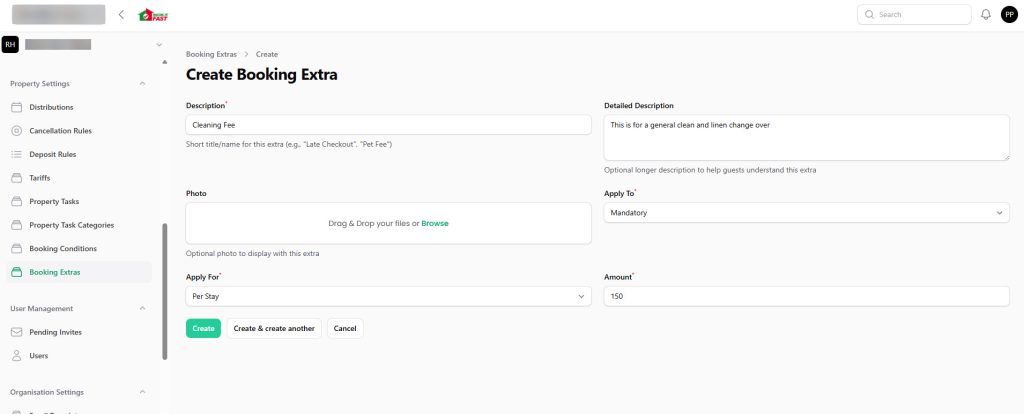
- Go to Property Settings → Booking Extras
- Click New booking extra
- Enter a description (e.g., “Cleaning Fee”, “Pet Fee”, “Extra Guest Fee”)
- Choose if it’s Mandatory or Optional
- Choose if it applies Per Stay or Per Night
- Enter the amount
- Click Create
Examples
Cleaning Fee (Per Stay)
- Description: Cleaning and Linen
- Type: Mandatory
- Applied: Per Stay
- Amount: $150
This adds a one-time $150 fee to every booking, regardless of how many nights the guest stays.
Pet Fee (Per Night)
- Description: Pet Fee
- Type: Optional
- Applied: Per Night
- Amount: $25
Guests can choose to add this when booking. The fee is charged for each night of the stay ($25 × number of nights).
Need help? Contact Book It Fast support at bookitfast@bookitfast.app