
Search our documentation
Set Up a Default Cleaner
Learn how to assign a default cleaner to your property so that new bookings are automatically assigned to them.
What is the Default Cleaner?
The Default Cleaner setting allows you to assign a cleaner to a property. Once set, every new booking created for that property will automatically be assigned to this cleaner. This saves you time by removing the need to manually assign a cleaner to each booking.
Before You Start
Before you can set a default cleaner, make sure you have:
- At least one property set up in your account
- At least one cleaner invited to your organisation (see the Invite Team Members guide)
How to Set a Default Cleaner
- Go to Properties in the left sidebar
- Click on the property you want to update
- Scroll down to the Default Cleaner dropdown
- Select the cleaner you want to assign from the dropdown list
- Click Save to apply your changes
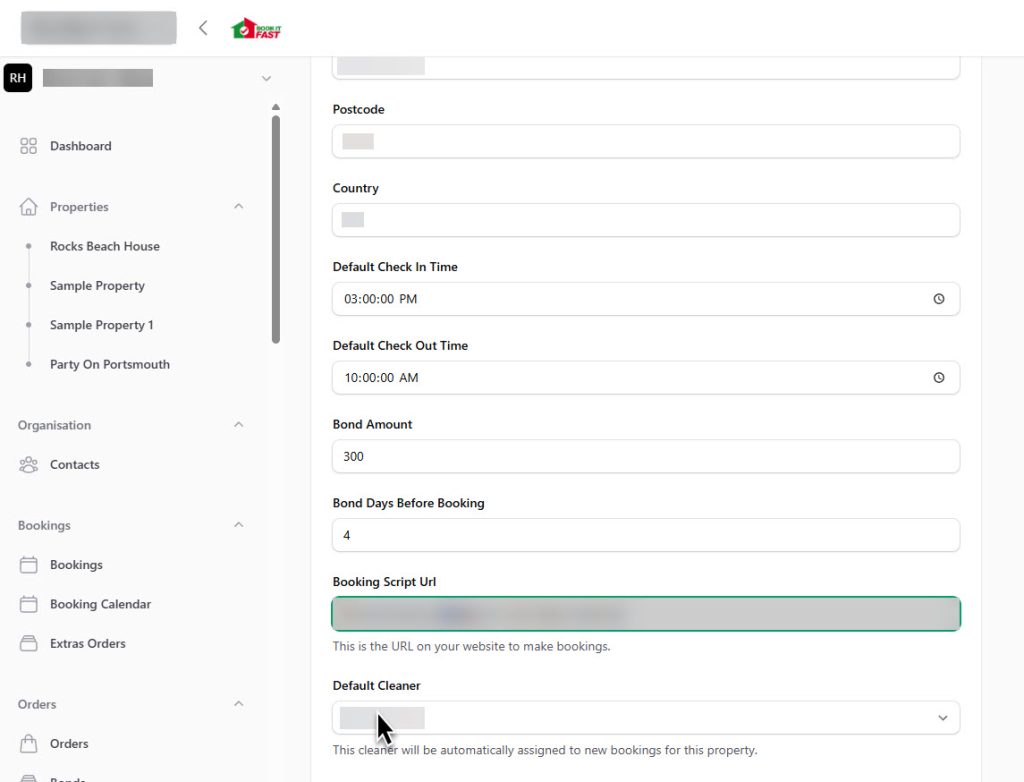
Once saved, this cleaner will be automatically assigned to all new bookings for this property.
Things to Know
- The default cleaner only applies to new bookings created after the setting is saved. Existing bookings are not affected.
- You can change or remove the default cleaner at any time by returning to the property settings.
- Each property can have its own default cleaner, so you can assign different cleaners to different properties.
Need help? Contact Book It Fast support at bookitfast@bookitfast.app