
Mail in booking details from your email
When a booking is synced from the various distribution platforms it only has a limited amount of data included which blocks out the dates straight away to avoid double bookings.
To bring in data from Airbnb and VRBO/Stayz it is easy to do.
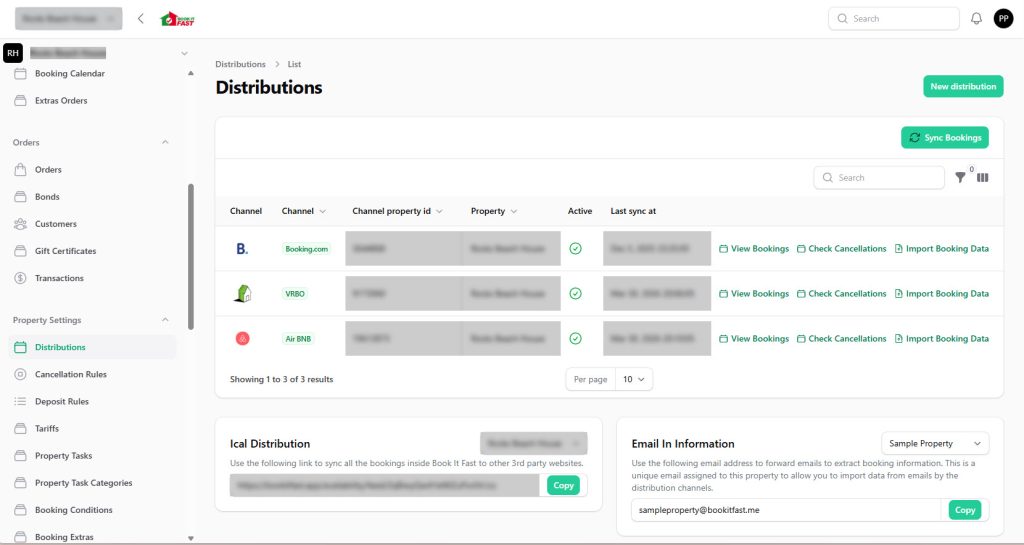
Simply go into the bookitfast admin and click on property settings->distributions.
Here at the bottom right, you will find a panel “Email In Information”. Click the copy button to copy the email address to clipboard.
Create a new contact in your email client
We recommend adding the email address into your email client (outlook, gmail, eMClient, thunderbird etc) so that it is quick and easy to send the email to from there.
Once this is set up simply forward the booking confirmation email through to the contact and you
Set up rules/filters to automate the process
To make this even easier we can automatically have these emails send to book it fast to process.
Airbnb mail rule
with ‘Reservation confirmed’ found in subject
and from ‘automated@airbnb.com’
send to your custom bookitfast.me email
VRBO mail rule
with ‘Instant Booking from’ found in subject
and from ‘sender@messages.homeaway.com’
send to your cusom bookitfast.me email